Monday, April 29, 2013

Teachers Are Using Blended Learning For Teaching Right Now

First of all, blended learning is the combination of face-to-face and online instruction for specific learning outcomes. 91% of teachers are using Email to teach the courses. 87% use Learning management system. 83% use PowerPoint, and 41% use Smart Board. Some teachers say that an online teaching is most convenient for them. Nowadays, 72% of students are using laptops, tablets, or smart phones in class.
People might be curious about how teachers teach students in their classroom. Here are some yield of 2012 that Lethbridge College surveyed from 164 instructors regarding to their teaching and technology.
  • 79% of instructors use blended learning in their teaching. 50% of instructors use face-to-face and another 50% of instructors use online technique in their teaching.
  • The most widely use of learning management system are online grading, online course outlines, online readings and links.
  • 92% of teachers prefer to use technology in the classroom.
  • 47% of respondents feel confident to look for support in integrating blended learning.

Major concepts

  • Lethbridge College surveyed from 164 instructors regarding to their teaching and technology.
  • Most teachers use technology in their teaching.
  • The number of teachers who use technology in the class room is getting increased.
Potential Strengths/Advantages
  • It's more convenient for both teachers and students to learn and teach.
  • Teachers can put grades online.
Potential Problems/Limitations/Disadvantages
  • Students might play games on their laptops or tablets if teachers allow them to use them in class.
Discuss Questions
  • Why lots of people are interesting in blended learning?
  • Is it necessary for students to have their own laptops or tablets?
Here's a video about blended learning


"Edudemic." Edudemic. N.p., n.d. Web. 28 Apr. 2013. <http://edudemic.com/2013/03/how-teachers-are-using-blended-learning/>

Thursday, April 25, 2013

Earth Day


I created this poster for the Earth Day by using Photoshop. I created this poster  in order to convince people to think more about the Earth. The Earth is like our big house, so we should take care of it and do not destroy it by your hands. We can simply save the world by reduce, reuse, and recycle. This poster tell you a bit about the facts that might scared you and you might not think that everything you do affect the world. So this is a good time for us to help the world together.

Sunday, April 21, 2013

Internet Users Are Unaware Of Downloading Illegal Stuff

Nearly half of the internet users are unaware of illegal downloading since they are confusing about which one is considered as illegal downloading and which one is considered as legal downloading.


According to the law firm Wiggins, around 2,500 respondents surveyed about this issue and they incorrectly said that people think that it is legal to download commercially produced media to a file-sharing website. More than 35% claimed that it was legal to download a film or TV shows from friends and some said that they didn't know that it was legal.


After they surveyed about this issue, they are agreed that it's important to have a copyright in order to protect the creative industries from piracy.


Some people also said that they regularly search on Google to find unauthorised content.


Major concepts

  • Most people do not know whether a file that they are downloading is considered as illegal or not.
  • Some people said it is legal to download a film or TV shows from friends.
  • There should be copyright for the file from piracy.
 Potential Strengths/Advantages
  • It is good to have copyright for legal files, so that people would know that they shouldn't download that file.
  • Having copyright helps people who create the file to protect their own files, so that not many people can download their files.
Potential Problems/Limitations/Disadvantages
  • Having copyright might create an uncomfortable to people since they can't download that file.
 Discussion Questions
  • Do people really care about the copyright?
  • How do we know that who is downloading an illegal files?


Hill, Amelia. "Internet Users Unaware of Illegal Downloading." The Guardian. Guardian News and Media, 21 Apr. 2013. Web. 21 Apr. 2013. <http://www.guardian.co.uk/technology/2013/apr/22/internet-users-unaware-illegal-downloading>

Monday, April 8, 2013

A Pebble Watch With A Lot Of Potential


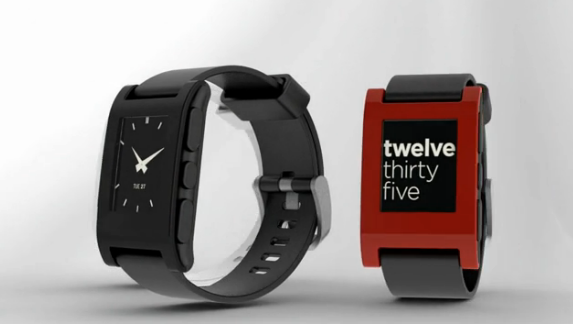
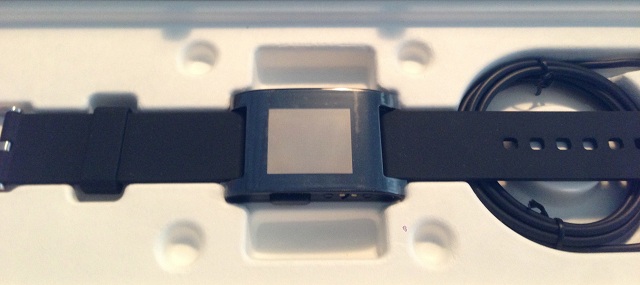
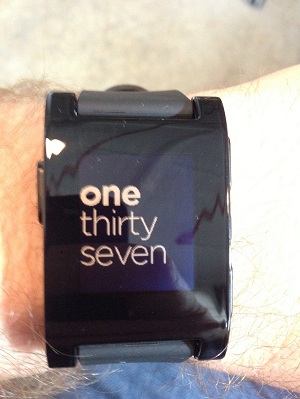
A pebble watch is an e-paper bracelet that can connect to the iOS and Android devices. The basic function of the pebble watch is that to tell the time, but it ships with three default watch faces. There is a custom watch face called "Fuzzy Time" which rounds the current time to the nearest 5 minutes interval. The first thing you'll see at the pebble watch is you current selected watch face and you can change it into another by using the 4 buttons on the watch. The main screen consists of music app, alarm, watchfaces, and setting. For the music app, you can use pause, play, and skip backwards or forwards. You can browse and select your watch faces.


The pebble watch is the combination of e-paper and use a low energy of Bluetooth. It runs on an ARM Cortex-M3 microcontroller and it will destroy a bit of your phone's batter life. This pebble watch is waterproof and you can go down for about 50 m or 164 ft underwater. The opportunity for the third party developers is to customized the watch faces and you can get the inspiration from the classic watches, then create for your own.


Eric Migicovsky is the founder and the CEO of this company. The advantages of this pebble watch are you can only look the notifications for the phone calls, emails, and text messages from the pebble watch simply by log in to Pebble from your web app and authenticate, then you can receive the notifications. It also allow native apps to use Pebble as a secondary output in real time.

Major Concepts
  • The pebble watch is an e-paper bracelet that can connect to the iOS and Android devices.
  • It can show you the notifications from your phone.
  • It's waterproof.
Potential Strengths/Advantages
  • This make your life becomes easier since you can look at the time and look at the notifications from your phone at the same time.
  • It's waterproof. So you don't need to worry that it's going to get wet.
Potential Problems/Limitations/Disadvantages.
  • The price is quite high, so somebody might think that it's not suit for its potential.
Discussion Questions
  • Is it going to be confusing since there are  few control buttons and we can do quite lots of things?
  •  If we only want to look at the time, do we need to use Bluetooth?
"ArsTechnica." Ars Technica. N.p., n.d. Web. 07 Apr. 2013. <http://arstechnica.com/gadgets/2013/04/hands-on-with-the-pebble-watch-a-handy-device-with-a-lot-of-potential/>


Monday, April 1, 2013

The Best 4 Ways To Encourage Students Learning Outside The Classroom

Nowadays, learning outside classroom become so famous because it can increase students' knowledge. Unfortunately, most of students are not interesting in learning outside outside the classroom because they want to play games and do some activities rather than sitting in the class and learning. Here are some ways to make an outside learning classroom gets more interesting.

  1. After-School Clubs: Students will have new friends, spending time together and even get some knowledge from joining clubs. Clubs could be about sports, academic, entertainment, and many more. This is a good idea in order to encourage learning outside classroom because it challenges students to do new things and it expands students' knowledge.
  2. Sports: Playing sports is one of the best way to encourage learning outside class room because it increases students' abilities to do things and social relationship. It also challenges students to compete with other people. Teachers could create a discussion about stats that can increase students' mathematics abilities while they're playing sports
  3. Startups: Business can spark ideas and motivate students to learn outside classroom. Teachers can assign students to start their small businesses. So they need to go get the information from the website, their parents, and their friends which can increase students' knowledge. It will challenge students to compete with their friends. So it motivates them to learn outside classroom.
  4. Gamification: It's an interesting way to encourages students to learn outside classroom because it's a mathematics games and encourage students to think and teachers could give them rewards. This is an enjoyable way for them to do homework and it could be DIY projects, and many more.

Just remember that all these ways can encourage students to spend some times outside classroom to get some knowledge. This makes students are willing to learn and do their works.

Major concepts
  • Most of students don't want to learn outside classroom. So here are some ways to encourage students to get interested in learning.
  • Teachers need to make learning to be fun, not in a boring way.
  • Students will get some knowledge from learning from fun stuff.
Potential Strengths/Advantages
  • All four ways are really good to encourage students to learn outside classroom because it's fun and motivates students to learn.
  • It increases students' abilities in many ways especially in mathematics abilities.
  • In the field of sport, it also increases their strength.
Potential Problems/Limitations/Disadvantages

  • These might not going to be useful for everyone since students are not going to get much knowledge. They just get some basic skills.
  • Since everyone is not the same, so teachers might not be ale to know which way they can motivate students to learn.
Discussion Questions

  • Are all these tips going to work with everyone?
  • If students still don't want to learn outside classroom, what should their parents do or are there any tips to help them learn?

"Edudemic." Edudemic. N.p., n.d. Web. 31 Mar. 2013. <http://edudemic.com/2013/03/4-ways-to-encourage-learning-outside-the-classroom/>

Monday, March 25, 2013

The Best 5 Apps for Kids This Week

Nowadays, there are so many apps for kids and there're some apps that can increase kids' Math abilities, English abilities, etc. Here are some good apps for kids that come out during this week.


  • Little Digits : This app is for the kids from ages 2 and above. It's an excellent app for kids in order to tech them a basic math. You have to use your fingers in order to play with this app. If you touch 1 finger on the screen, the number will increase by 1. On the other hand, if you life your fingers up, the numbers will decrease. This apps is  ind of confusing at first, but you can watch the tutorial to make you better understand. Here are some statistics of this app --> Overall rating: 4.2 out of 5 stars, ease of use: 7/10, educational: 9/10, and entertaining: 8/10. The price for this app is only $2.99
  • Count to 100 : This app is for the kids from ages of 3 and above. This app can increase kids' math abilities. Kids are asked to solve specific challenges, and try to explore things. This app is only $1.99 and here are some statistics for this app --> Ease to use 10/10, educational 9/10.
  • Mathopolis (Addition, subtraction, multiplication, and division) : This app is for the kids from ages of 5 and above. This app is like a self-correcting worksheet. They have to solve lots of math problems based on addition, subtraction, multiplication, and division. The price for this app is only $0.99 and here are some statistics for this app --> Overall rating: 4.4 out of 5 stars, ease to use 9/10, educational 9/10, and entertaining 8/10.

  • Stack the States : This app is for the kids from ages of 7 and above. This app is asking the kids to choose the correct flag for each country. The way to play this app is the kids have to drop the flag onto a platform and the goal is to earn enough states to build a stack. If you want to play in the full version, of course you have to upgrade it. Here are some statistics for this app --> Overall rating: 4.5 out of 5 stars, ease to use  8/10, educational 10/10, entertaining 9/10. The price is only $0.99

  • What Will I Be? : This app is for the kids from ages 3 and above. In this app, there are nineteen watercolor depict different professions for both males and females. This app costs only $2.99 and the overall rating is 4.4 out of 5 stars. These are some statistics of this app --> ease of use 9/10, educational 8/10, and entertaining 9/10.

Major Concepts

  • There are the best 5 apps for kids that come out during this week.
  • Almost all the apps can increase children's abilities.
  • Most people like all the apps.
 Potential Strengths/Advantages.

  • All these apps can help children with math abilities.
  • The price of apps are not that expensive.
  • It's easier for children to learn some basic stuff.
 Potential Problems/Limitations/Disadvantages
  • The kids might play other games rather than playing these useful apps.
  • If the children use iPad for long time, it might have effects on their eyes.
Discussion Questions.
  • Are these apps really going to help children with math abilities?
  • If the children play all these apps all day and don't do anything else, what should the parents deal with this problem?


"Mashable." Mashable. N.p., n.d. Web. 25 Mar. 2013. <http://mashable.com/2013/03/24/top-kids-apps-2-2/>.


Monday, March 18, 2013

Let's take a look of what happens on the Internet every second, minute, hour, and day.

Nowadays, almost 2.5 billion people around the world use internet, and these numbers of people are increasing everyday. It's really interesting to know about what people do on the internet in every second, minute, hour, and day.
 In a second, 2.8 million emails are sent. It's like all 2.8 million people click "send" all at once, 333 new Tumblr posts are made, and 1,633 tweets were published.


In a minute, there are 694,445 doing a Google search on Google, 320 new twitter accounts are made, and 600 videos are uploaded to Youtube. 
In an hour, there are 10.5 million pictures uploaded to Facebook. People downloaded 780,000 iPhone Apps. This is about $116,220. About 4,200 new domains are registered.
So, in one day, there are 95 Years videos are uploaded to Youtube, 172 million people come online on Facebook. Overall, the world spends 133,333 Years online.
Major concepts
  • The numbers of internet uses are increasing everyday.
  • There are so many things happen on the internet in every second, minute, hour, and day.
  • All these statistics show that people spend so much time on the internet.
Potential Strengths/Advantages
  • These statistics help us to figure out what people are interested on the internet whether it's in negative or positive ways.
  • It shows that internet have an impact influence on people nowadays.
Potential Problems/Limitations/Disadvantages.
  • People spend more time on internet.
  • Some people use internet in a good way such as do some reasearch. On the other hand, some people use internet in a negative way.
Discussion Questions
  • How do they get these statistics?
  • Can we believe in these statistics?

"What Happens On The Internet Every Second, Minute, Hour And Day? [INFOGRAPHIC]." - AllTwitter. N.p., n.d. Web. 17 Mar. 2013.

Monday, March 4, 2013

9 Ways for Job Seekers to Impressed Employers

There is a survey that tries to observe the most impressive action the employers have seen from the human resources. There are nine creative ways for job seekers to impressed their employers.
1. A candidate walked in with a cup of coffee, donuts, and hold the resume underneath.


2. A candidate should tells the employer about his or her plan in the first six months.


3. A candidate should contact the company's board of directors in order to make his or her case for being hired.


4. A candidate should make a video message to explain why his or her should get the job.


5. Some candidates drive their own vehicle to show their skills.


6. A candidate need to prepare his or her online portfolio and presentation.


7. A candidate may send a handmade card when the hiring manager get sick.


8. A candidate could bring his or her letter of reference, certificates of achievement, and awards.


9. A candidate may bring his or her performance review from the past employer.


Major concepts

  • Tips for job seekers about how to impressed the employers.
  • The things that job seekers should do while having the interview with hiring manager.
  • The things that job seekers should prepare before going to interview with hiring manager.
Potential Strengths/Advantages
  • Most of the tips are quite easy to follow.
  • There are online portfolio and presentation. So the employers might be interested in candidates, and might hire them to work for their companies.
  • This also helps people to have a good manner. For example, when the hiring manager get sick, the job seekers should send a card to the hiring manager. This shows that the job seekers are care of the hiring manager.
Potential Problems/Limitations/Disadvantages
  • All these tips might not work for everyone because it depends on a person.
  • I think to have a cup of coffee and donuts is not a good manner for job seekers when they're talking or have a meeting with the employers.
Discussion Questions
  • Are these tips going to work with everyone?
  • If we miss one tips, are the results going to change?

Forbes. Forbes Magazine, n.d. Web. 04 Mar. 2013.orbes. Forbes Magazine, n.d. Web. 03 Mar. 2013.


Monday, February 18, 2013

One laptop for children 7 years later


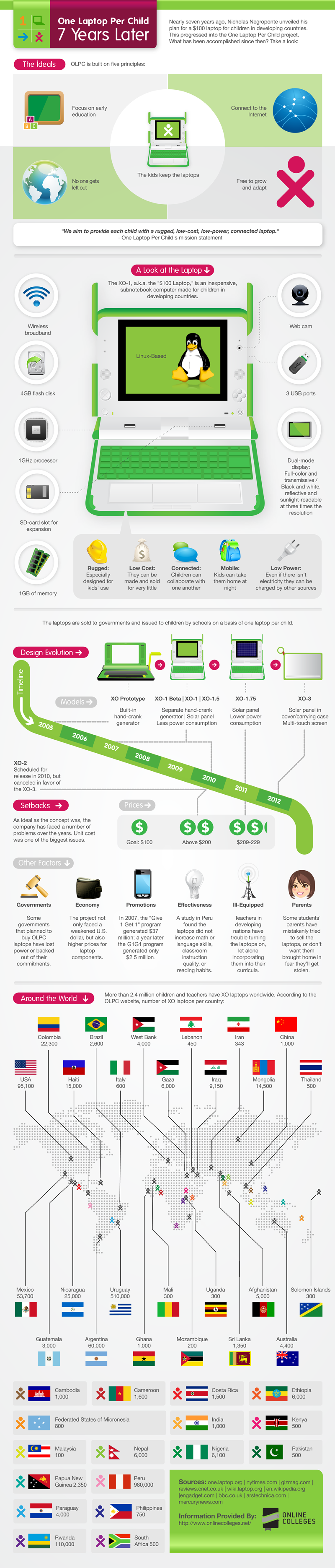
Nicholas Negroponte planned for $100 laptop for children in nearly seven years ago. They aim to provide each child with a rugged, low-cost, low power, connected laptop. OLPC is built on five principles :
1. This laptop focuses on early education, so children know how to use laptop since at the early age.
2. Connect to the internet, so children can search information form the internet.
3. The kids keep laptop.
4. No one gets left out.
5. Free to grow and adapt, so children learn by themselves and can adapt themselves to the environment.

A look at the laptop
1. wireless broadband
2. 4 GB flash disk
3. 1 GHz processor
4. SD-card slot for expansion
5. 1GB of memory
6. Web cam
7. 3USB ports
8. Dual-mode display : full-color and transmissive/ black and white, reflective and sunlight-readable at three times the resolution.

This is an inexpensive subnotebook computer made for children in developing countries
- Rugged : Designed for kid's use.
- Low cost : They can be made and sold for very little.
- Connected : Children can collaborate with one another.
- Mobile : They can take them home at night.
- Low power : Even if there isn't electricity they can be charged by other sources.

Design evolution
- XO Prototype was built in 2005. It's a built-in hand-crank generator.
- XO-1 Beta | XO-1 | XO-1.5 was built during 2007 to 2010. It's separate hand-crank generator | solar panel less power consumption.
- XO-2 was built in 2010. 
- XO-1.75 was built in 2011. It's a sola panel lower power consumption.
- XO-3 was built in 2012. It's a solar panel in cover/carrying case Multi-touch screen.

Price
Unit cost was one of the biggest issues. In 2010, the price goes above $200, and in 2011 the price goes to $209-299. The goal is only $100. Factors than affect the price
- Government : Some governments that planned to buy OLPS laptops have lost power or backed out of their commitments.
- Economy : The project not only faced a weakened U.S. dollar, but also higher prices for laptop components.
- Promotions : In 2007, the "Give 1 Get 1" program generated $37 million; a year later the G1G1 program generated only $2.5 million.
- Effectiveness : A study in Peru found that laptops didn't increase math or language skills or reading habits.
- lll-Equipped : Teachers in developing nations have trouble turning the laptops on, let alone incorporating them into their curricula.
- Parents : Some students' parents have mistakenly tried to sell the laptops, or don't want them brought home in fear they'll get stolen.

*More than 2.4 million children and teachers have XO laptops worldwide. According to the OLPC website, number of XO laptops per country:
- Colombia : 22,300                - Mexico : 53,700                     - Cambodia : 1,000
- Brazil : 2,600                       - Nicaragua : 25,000                  - Cameroon : 1,600
- West Bank : 4,000                - Uruguay : 510,000                  - Costa Rica : 1,500
- Lebanon : 450                      - Mali : 300                              - Ethiopia : 6,000
- Iran : 343                             - Uganda : 300                         - Federated States of Micronesia : 800
- China : 1,000                        - Afghanistan : 5,000                - India : 1,000
- USA : 95,100                       - Solomon Islands : 300             - Kenya : 500
- Haiti : 15,000                       - Guatemala : 3,000                   - Malaysia : 100
- Italy : 600                            - Argentina : 60,000                  - Nepal : 6,000
- Gaza : 6,000                         - Ghana : 1,000                         - Nigeria : 6,100
- Iraq : 9,150                          - Mozambique : 200                   - Pakistan : 500
- Mongolia : 14,500                 - Sri Lanka : 1,350                    - Papua New Guinea : 2,350
- Thailand : 500                       - Australia : 4,400                     - Peru : 980,000
- Paraguay : 4,000                    - Rwanda : 110,000                   - South Africa : 500
-Philippines : 750


How to get started using an OLPC laptop


Major concepts
  • Nicholas Negroponte unveiled his plan for a $100 laptop for children in developing countries.
  • OLPC built on five principles : Focus on early education, connect to the internet, the kids keep the laptops, no one gets left out, and free to grow and adapt.
  • The prices is getting higher.
  • Nowadays, XO laptops use by children worldwide.
Potential Strengths/Advantages
  • This is make children's life become easier.
  • Children can search information from the internet.
  • They can save their work in the laptops.
Potential Problems/Limitations/Disadvantages
  • The price is getting higher.
  • If the children can connect to the internet, they could easily find some games or some silly stuffs.
Discussion Questions
  • Do every children get this laptop?
  • For the children in the countries that are not developing, will they have the chance to use this laptop?


"ONE LAPTOP PER CHILD 7 YEARS LATER." Infographics King. N.p., n.d. Web. 17 Feb. 2013.

Sunday, January 27, 2013

Top Best App Creation Tools!

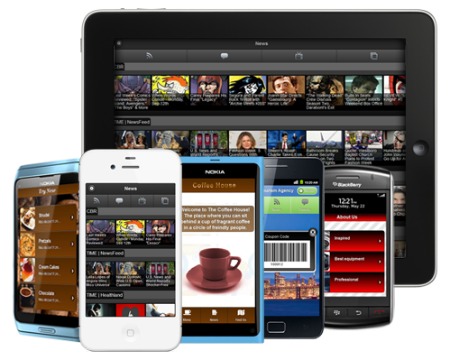
Nowadays, there are so many application available on the internet, smartphone, ipad, etc. We usually think that it's difficult to create an App. Now, you have to change your mind because there are app creation tools that you can create your own app. It's faster, cheaper, easier, and you don't need to be a developer. These are the best app creation tools

1. Cabana - This is the visual way to make gorgeous custom mobile apps. For more information go to www.cabanaapp.com


2. Mobile Roadie - This is a full CMS and no coding app builder for iOS and Android. For more information go to www.mobileroadie.com


3. Appafolio - This is 100% native app, content caching for offline viewing and more. For more information go to www.appafolio.com


4. AppMaker - This is a point and click solution for building rich content based apps. For more information go to www.appmakr.com


5. Rare Wire - This app offers true cross platform native Apps built in our WIRE XML. For more information go to www.rarewire.com


6. GameSalad Creator - You can use this app to create, test, and publish your own games. For more information go to www.gamesalad.com


7. Bizness Apps - This is mobile apps for businesses. For more information go to www.biznessapps.com


8. Webmobi - You can use this app to create a mobile web app in minutes. For more information go to www.webmobi.com


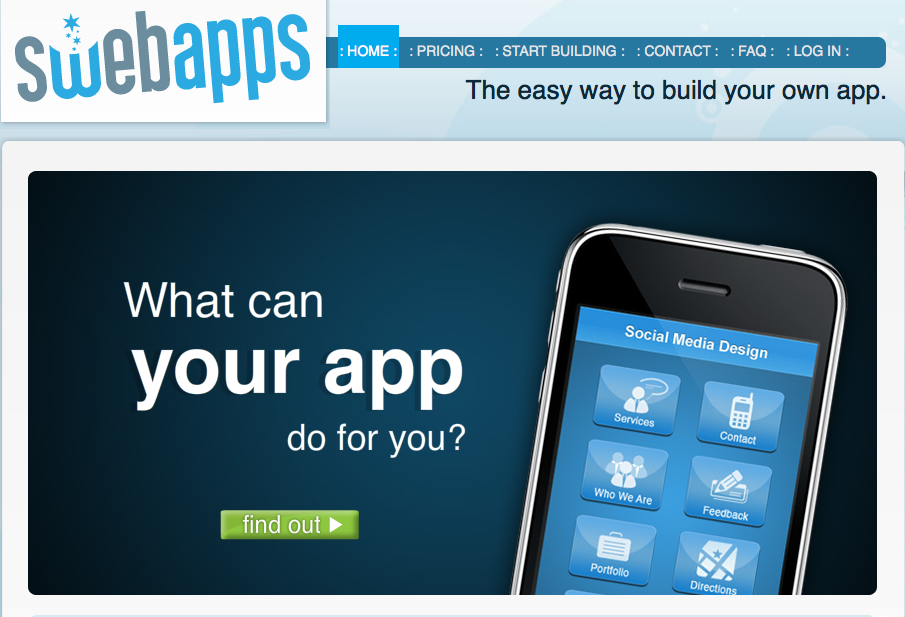
9. SwebApps - This is an easy way to build your app in minutes. For more information go to www.swebapps.com


10. TapLynx - From using this app, you can create an app from your website in minutes. For more information go to www.taplynx.com


11. AppBreeder - This is an online iPhone app builder. For more information go to www.appbreeder.com

12. App Press - This app can helps you to build iOS apps without coding. For more information go to www.myapppress.com


13. Dapp - This is an application to design and create your own apps. For more information go to www.dapp.kerofrog.com.au


14.Seattle Clouds - If you just started creating your native iPhone app, I recommended you to use this app. For more information go to www.seattleclouds.com


Major concepts
  • Nowadays, people usually think that it's difficult to create their own apps.
  • But, there're so many applications that you can create your own apps easier, and cheaper.
  • You also don't need to be a developer.
Potential strengths/advantages
  • There're pictures of each application. So it might get more attention from the readers.
  • They provided so many applications for the readers to choose.
Potential problems/limitations/disadvantages
  • There're a few information for each application and the introduction is quite short.
Discussion questions
  • Do we have to pay if we create apps?
  • How other people going to know or use our apps?

"Best App Creation Tools." Infographix Directory RSS. N.p., n.d. Web. 27 Jan. 2013.

Monday, January 21, 2013

How to backup or restore Iphone contacts by using ICloud or Email Address

Since people can send messages across Iphones, Ipads, and Ipod touches via iMessage and stuffs, the iOS users have to worry about backing up the device because as your fingers tips on the screen, your contacts might be disappear. To make sure that the contacts in their phones are not disappear, there can use two easy ways to backed up the data in their phones which are backing up contacts using iCloud and backing up contacts using an email address.

Backing up contacts using iCloud
iCloud is one of the easiest way to restore or back up your data or contacts. In order to use iCloud to estore or backed up the data in your phone, the device must be running iOS 5.x or above
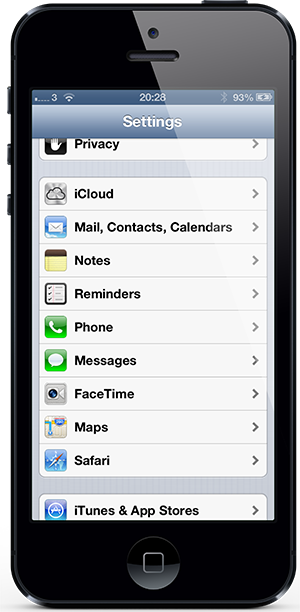
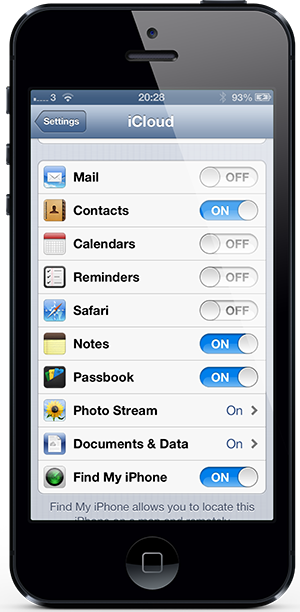
1. Open up the setting and then run iOS 5.x or above, then select the iCloud cell.


2. Make sure that you set the Contact toggle on.


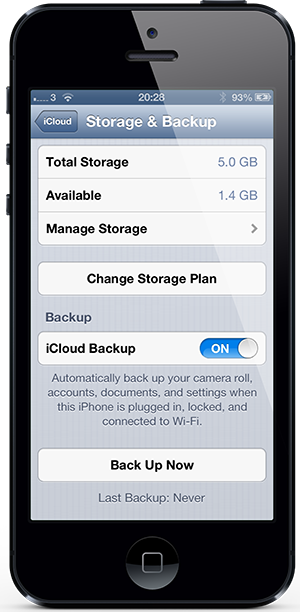
3. If an iCloud backup has never been performed before, you have to select Storage & Backup cell first.
4. Before you select the Back Uo Now option, you have to make sure that the iCloud backup is set on because this provides an estimated time to complete this process. This also requires a Wi-Fi connection.
5. If you use a new iOS device, make sure that the Contact toggle is set on to sync the backup contacts to new device by using the same Apple ID.

Backing up contacts using an email address
This method, we will use a Gmail account, but this should work any mail account that can sync through Microsoft Exchange.
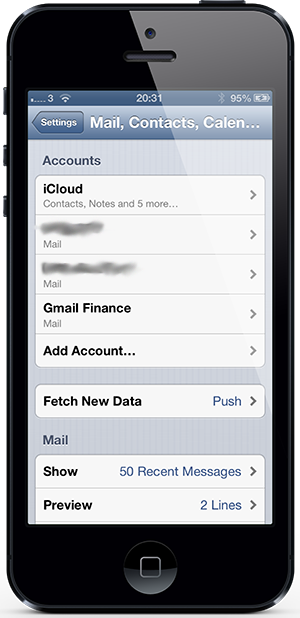
1. Open up the setting and select the Mail, Contacts, Calendars option.

2. If you already have an account, but you want to add a new one, so select Add Account before selecting Microsoft Exchange.

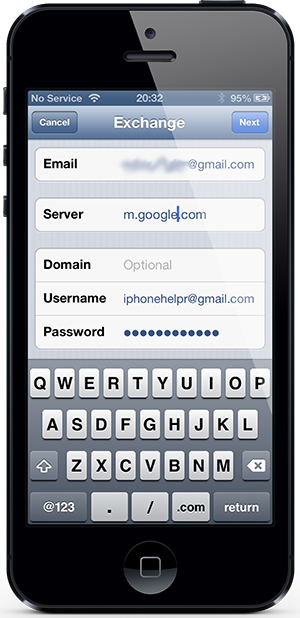
3. Add the relevant email adress before adding account password or an informative description of the account.


4. Select Next before adding m.google.com and adding the email address again as the account username.

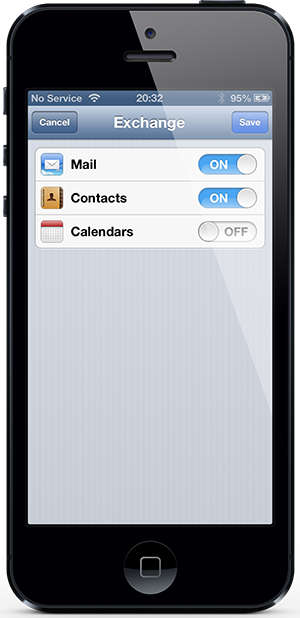
5. Then select Next and make sure that the Contacts toggle on the next screen is set on.


Major concepts
  • Nowadays, people send messages across many devices, so they provide methods to restore or back up the data.
  • There're two methods to restore or back up the contacts.
  • First method is to back up contacts by using iCloud.
  • Second method is to back up contacts by using an email address.
Potential Strengths/Advantages
  • The author describes the method in an easy way by using short sentences and easy vocabulary that all people could understand.
  • The author also posted the picture under the description. This is easy to follow the steps.
Potential Problems/Limitations/Disadvantages

  • Some specific words such as Microsoft Exchange, the audiences might not know what is it. So this might create a confusing situation in the audiences.
Discussion Questions

  • What is Microsoft Exchange?
  • I don't really get step 2 in the second method.


"How To Backup / Restore IPhone Contacts Via ICloud Or Email Address | Redmond Pie." Redmond Pie RSS. N.p., n.d. Web. 20 Jan. 2013.