Sunday, January 27, 2013

Top Best App Creation Tools!

Nowadays, there are so many application available on the internet, smartphone, ipad, etc. We usually think that it's difficult to create an App. Now, you have to change your mind because there are app creation tools that you can create your own app. It's faster, cheaper, easier, and you don't need to be a developer. These are the best app creation tools

1. Cabana - This is the visual way to make gorgeous custom mobile apps. For more information go to www.cabanaapp.com


2. Mobile Roadie - This is a full CMS and no coding app builder for iOS and Android. For more information go to www.mobileroadie.com


3. Appafolio - This is 100% native app, content caching for offline viewing and more. For more information go to www.appafolio.com


4. AppMaker - This is a point and click solution for building rich content based apps. For more information go to www.appmakr.com


5. Rare Wire - This app offers true cross platform native Apps built in our WIRE XML. For more information go to www.rarewire.com


6. GameSalad Creator - You can use this app to create, test, and publish your own games. For more information go to www.gamesalad.com


7. Bizness Apps - This is mobile apps for businesses. For more information go to www.biznessapps.com


8. Webmobi - You can use this app to create a mobile web app in minutes. For more information go to www.webmobi.com

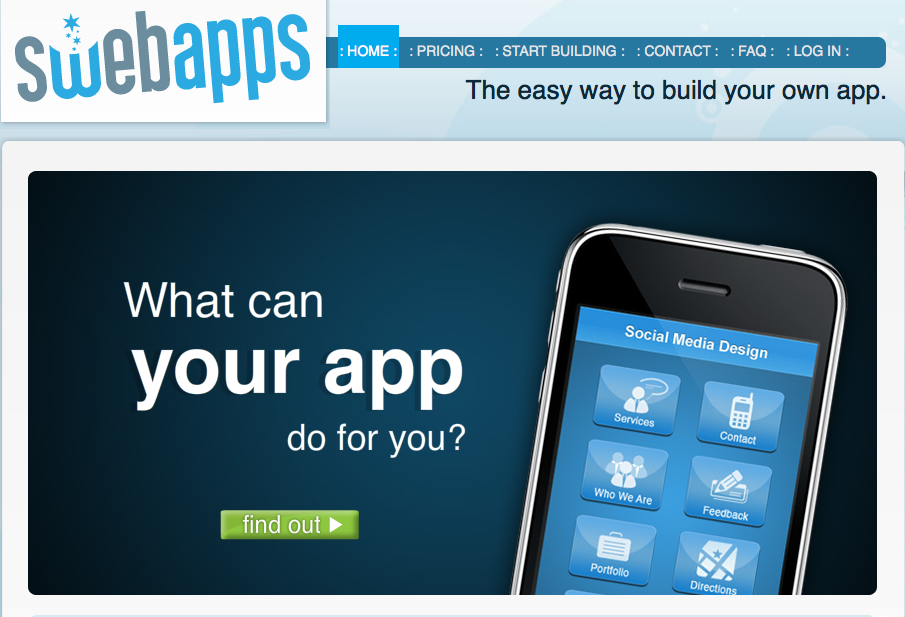
9. SwebApps - This is an easy way to build your app in minutes. For more information go to www.swebapps.com

10. TapLynx - From using this app, you can create an app from your website in minutes. For more information go to www.taplynx.com


11. AppBreeder - This is an online iPhone app builder. For more information go to www.appbreeder.com

12. App Press - This app can helps you to build iOS apps without coding. For more information go to www.myapppress.com


13. Dapp - This is an application to design and create your own apps. For more information go to www.dapp.kerofrog.com.au


14.Seattle Clouds - If you just started creating your native iPhone app, I recommended you to use this app. For more information go to www.seattleclouds.com


Major concepts
  • Nowadays, people usually think that it's difficult to create their own apps.
  • But, there're so many applications that you can create your own apps easier, and cheaper.
  • You also don't need to be a developer.
Potential strengths/advantages
  • There're pictures of each application. So it might get more attention from the readers.
  • They provided so many applications for the readers to choose.
Potential problems/limitations/disadvantages
  • There're a few information for each application and the introduction is quite short.
Discussion questions
  • Do we have to pay if we create apps?
  • How other people going to know or use our apps?

"Best App Creation Tools." Infographix Directory RSS. N.p., n.d. Web. 27 Jan. 2013.

Monday, January 21, 2013

How to backup or restore Iphone contacts by using ICloud or Email Address

Since people can send messages across Iphones, Ipads, and Ipod touches via iMessage and stuffs, the iOS users have to worry about backing up the device because as your fingers tips on the screen, your contacts might be disappear. To make sure that the contacts in their phones are not disappear, there can use two easy ways to backed up the data in their phones which are backing up contacts using iCloud and backing up contacts using an email address.

Backing up contacts using iCloud
iCloud is one of the easiest way to restore or back up your data or contacts. In order to use iCloud to estore or backed up the data in your phone, the device must be running iOS 5.x or above
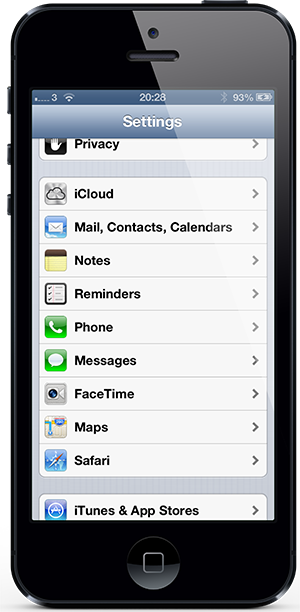
1. Open up the setting and then run iOS 5.x or above, then select the iCloud cell.


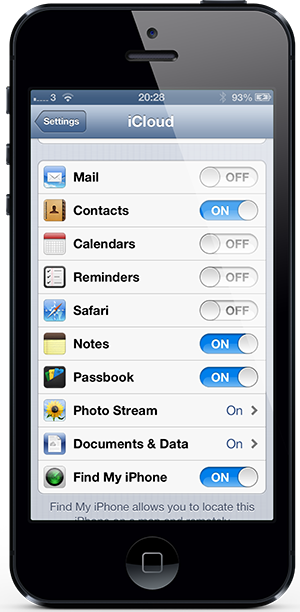
2. Make sure that you set the Contact toggle on.


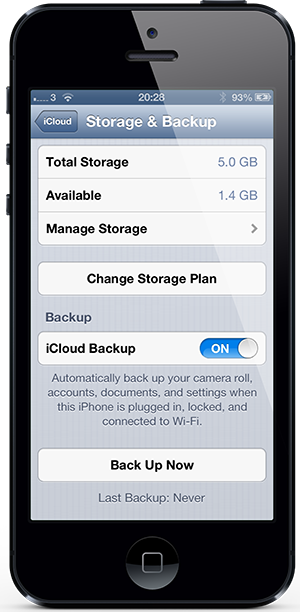
3. If an iCloud backup has never been performed before, you have to select Storage & Backup cell first.

4. Before you select the Back Uo Now option, you have to make sure that the iCloud backup is set on because this provides an estimated time to complete this process. This also requires a Wi-Fi connection.
5. If you use a new iOS device, make sure that the Contact toggle is set on to sync the backup contacts to new device by using the same Apple ID.

Backing up contacts using an email address
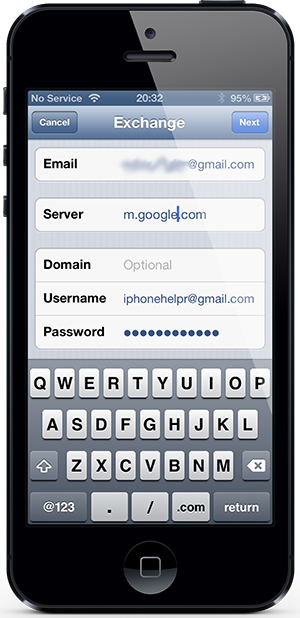
This method, we will use a Gmail account, but this should work any mail account that can sync through Microsoft Exchange.
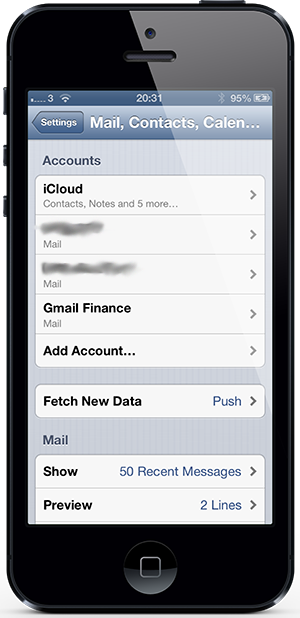
1. Open up the setting and select the Mail, Contacts, Calendars option.

2. If you already have an account, but you want to add a new one, so select Add Account before selecting Microsoft Exchange.

3. Add the relevant email adress before adding account password or an informative description of the account.


4. Select Next before adding m.google.com and adding the email address again as the account username.

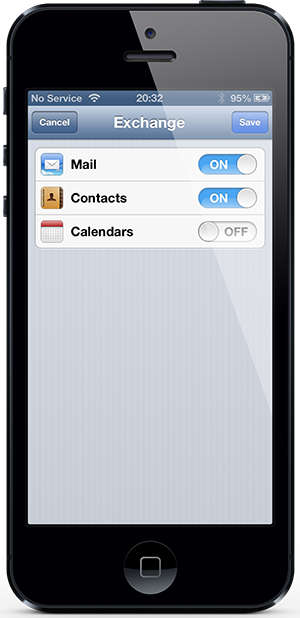
5. Then select Next and make sure that the Contacts toggle on the next screen is set on.


Major concepts
  • Nowadays, people send messages across many devices, so they provide methods to restore or back up the data.
  • There're two methods to restore or back up the contacts.
  • First method is to back up contacts by using iCloud.
  • Second method is to back up contacts by using an email address.
Potential Strengths/Advantages
  • The author describes the method in an easy way by using short sentences and easy vocabulary that all people could understand.
  • The author also posted the picture under the description. This is easy to follow the steps.
Potential Problems/Limitations/Disadvantages

  • Some specific words such as Microsoft Exchange, the audiences might not know what is it. So this might create a confusing situation in the audiences.
Discussion Questions

  • What is Microsoft Exchange?
  • I don't really get step 2 in the second method.


"How To Backup / Restore IPhone Contacts Via ICloud Or Email Address | Redmond Pie." Redmond Pie RSS. N.p., n.d. Web. 20 Jan. 2013.


Monday, January 14, 2013

EdTech startup a site called "Papermache" to helps students with a better online research.

Summary
Nowadays, there are lots of bad or incorrect information on the internet and it might affect the students that they might get a wrong information. To solve this problem Los Angeles startup Papermache site to help those students and this site will combine a digital portfolio and students' graded research paper in one site. They can discuss the information or others' opinions safely, so they would get a relevant information. Benjamin Fenigsohn and the team was a founder of Papermache site and he said that when he was young, he was wondering why students have to write research papers which he thought that it was a universal assignments. So he wanted to help students get the ideas or citations in one place. The purpose of creating this site is to avoid the cheating of information and protect the right of the owner, but for undergraduate students, they can upload the content. This site is undergoing a $5000 crowdfunding campaign to push the final 36 development before beta launch.

Major concept

  • Nowadays, most of students engage with the internet more often because  that have to find some information from the internet, but unfortunately there are lots of incorrect information available on the internet. So the students will easily get wrong information form the internet.
  • Benjamin was a founder of Papermache and he was worrying about the students doing the research paper. So he wanted to help them.
  • He created this site to allow students discuss and talk about the information safely. They also can put their graded research paper on this site.
  • This site includes all the things needed to write the research paper and it also provided the right of the owner from cheating.
Potential strengths/Advantages
  • As the author said, nowadays there are both correct and incorrect information available on the internet, so this might affect students that they might get wrong information. I think this is a strength in this article because this argument is the fact that most of the students are facing with this problem right now.
  • Nowadays, students usually take the information from the internet without any citations such as the website or the authors. This isn't fair for the original authors because they give the information to us but we take their ideas or information without giving them credits. Fortunately, this site provides the right of protection for the owner. This is one of the things that I've never considered before.
Potential problems/Limitations/Disadvantages
  • I think the weakness of this article is the author didn't provide the sources for the reader. So the information might be wrong because we don't know where are these information come from.
  • I think more details are needed because if someone is interesting in this topic, they might want to know more about this. So if the author didn't provide enough information, the readers might complain or turn their attention away from this article. I think this is what the author is overlooked.
Discuss questions
  • Will us really get the correct information from this site?
  • Do we have to pay for using this site?
  • Can we get all the information we want from this site?


Fenigsohn, Benjamin. "EdTech Startup Papermache Aims To Inspire Better Online Research." Edudemic. N.p., 13 Jan. 2013. Web. 14 Jan. 2013. <http://edudemic.com/2013/01/papermache-research-tool/>.